February 28, 2012

Author discovers that Amazon can reprice his indie Kindle books however they want and cut his royalties, at will

Veteran author Jim C Hines offered some of his titles independently direct through Amazon's Kindle store. He discovered that Amazon reserves the right to arbitrarily reprice his books -- slashing the cover price of a $2.99 title to $0.99 -- and pay royalties on the lower price.

Hines points out that when his traditional publisher and its bookseller partners decide to offer his work at sale prices, he still gets paid royalties based on the cover price, and discusses the difficulties he faces in lacking the clout of an agent or a major publisher in negotiating with Amazon over this practice.

With my DAW books, if a bookstore offers a sale, I still get my royalties based on the cover price. Amazon is selling Libriomancer for pre-order at almost half-off, but I'll get paid my full amount for every copy sold. Not so with self-published titles. Looking at my reports for last week, my royalties were slashed by 2/3 for every copy sold, because Amazon paid me 70% of the $.99 sale price, not my list price.

According to the KDP Pricing Page, royalties should be based on the list price ($2.99) unless the price adjustment was due to a price-matching situation (dropping the price to match a competitor's price) … but my royalties report still shows a 67% cut.

When I followed up with the DTP team, they responded thusly:

.............


http://boingboing.net/2012/02/26/author-discovers-that-amazon-c.html

Tethering a Kindle for free 3G


[Excelangue] just posted a guide to using the free 3G connection in your Amazon Kindle to browse the Internet on your computer.

The hack requires a Kindle Keyboard 3G and the free worldwide Internet access that comes along with the purchase price. After jailbreaking the Kindle and applying a USB network hack, [Excelangue] managed to connect his laptop to the Internet through his computer. The process of tethering the Kindle's 3G is remarkably easy, but we expect a one-click solution will pop up on the web sometime this week.

Of course we have to note here that tethering a Kindle is against the Amazon terms & conditions, and the data going through your Kindle is tied to a unique ID. If you do this, Amazon knows who you are and is more than likely willing to brick your device. [Excelangue] is looking into tethering to the Kindle over WiFi so Android and iOS devices can get in on the action, but he's still in the process of experimenting with his build.


Tethering a Kindle for free 3G
http://hackaday.com/2012/02/27/tethering-a-kindle-for-free-3g/

Tether Kindle 3

Warning! The process by which one harnesses the Kindle's free 3G is a violation of the Kindle 3G's terms and agreements. In addition, the key used to access 3G is tied directly to your unique Kindle. All traffic obtained in this manner is sent through Amazon's proxy server. Amazon knows who you are.

Enable debug mode and usbNetwork by typing in these commands in the search box:

Plug your Kindle into the target computer. The "USB Connected" screen should no longer appear on the Kindle. Instead, a message should appear on your computer noting that a new device has been connected. If no message appears, open System Preferences, Network Pane, and click the Plus sign under the list of devices. Select these options:

The name is not needed, but is recommended.

After the Kindle interface is set up, configure DCHP like so:

Manually, with an IP address of 192.168.2.1. Other fields are not needed.

X-FSN Method 1 (Difficult, quicker)

If you have Windows, method 2 is easier.

Remember to enable Wireless in the Kindle, and check that a 3G signal is present before proceeding.

After these steps are completed, open a new Terminal window (You can press Cmd-Space, and search for Terminal with Spotlight). Enter these commands:

telnet 192.168.2.1

/mnt/us/tcpdump-arm -nAi ppp0 -s0

Afterwards, your window should look similar to the results below:

............read more.....


Tether Kindle 3
http://lickitung.it.cx/page/tether.html

iBooks on your Kindle? Now Possible with DRM Removal

Setting aside for a second the legal and ethical questions, let me first focus on the news that Apple's FairPlay digital rights management (DRM) system for iBooks has been cracked. Using the latest version of Requiem, a FairPlay cracking tool that has offered DRM removal for music and movies for a number of years, it would now be possible to read your iBookstore purchases on a Kindle or other device. Possible. Not necessarily legal or ethical, but possible.

Actually, the way that Requiem works, strikes me as being a bit more ethical than other DRM removal tools for Kindle, Nook, and Adobe Digital Editions DRMthat have been previously highlighted on sites like boing boing. Unlike those tools that strip away the DRM from any file, Requiem does not actually break the DRM on an iBook. According to documentation it uses a legal key to open a legal copy of an iBook…but then it leaves the door unlocked. So in my eyes, this is not a tool designed to pirate any digital content, but rather to allow an "owner" of digital content to access it as she or he desires on a device of his or her choice. I am sure the law, Apple, publishers, authors and others would see it differently. 

In the end, what Requiem really provides is a way to remove "friction" from reading iBooks. More on that newly re-defined and still quite confusing concept soon.

http://americanlibrariesmagazine.org/e-content/ibooks-your-kindle-now-possible-drm-removal

February 25, 2012

Web Ink Now: Newsjacking via a real time Kindle book

Linsanity

Here's a new book you can get on your Kindle: Linsanity: The Improbable Rise of Jeremy Lin

What?! Jeremy Lin has been the hottest sports story for less than two weeks and there's already books about him?

Welcome to the new world of Newsjacking via Kindle.

This book is by Alan Goldsher and according to a Fast Company author interview with him, it took 72 hours to write a 15,000-plus-word manuscript, 36 hours using Vook technology to build the e-book, and then another 24 hours to arrange distribution.

And now we're not only talking about Lin the basketball player, we're also talking about Lin the book and about author Alan Goldsher.

Newsjacking

Newsjacking cover

Whenever there is a hot story in the news, there is an opportunity to create and publish original content that the media will find and will get you coverage.

Newsjacking can be by writing a blog post, doing a YouTube video, creating an infographic, or even publishing a book on Kindle.

Business-to-Business and Nonprofits too

In B2B markets, I'm imagining a scenario where a new regulation hits an industry and some smart person does a speedy analysis of what it means for the industry and publishes that as a Kindle book.

Or in the nonprofit world, a natural disaster strikes and people are looking for how to help the victims and how to protect themselves in the future.

Write the book quickly and get it out fast. Then blog it, tweet it, and send a media alert about it.

The Newsjacking aspect comes in because the media, looking for background on a story, may read and then cite the book in their stories on the new regulation.

Newsjacking is cool. It's fun. And it gets you ink!

A hat tip to Tony Faustino who alerted me to this story. Hey Tony, you newsjacked the story of the Kindle newsjack of Jeremy Lin. Nice work!

Life of a news story


http://www.webinknow.com/2012/02/newsjacking-via-a-real-time-kindle-book.html

Kindle cover to help people with dsylexia

readright
ReadRight cover overlays come in three colours

An inventor has come up with a cover for Amazon's Kindle that has a coloured overlay that will help some people who are dyslexic or have visual impairments use these ebook readers.

John Hampton, the developer of the ReadRight cover, said coloured overlays and tinted glasses have been proven to work on hard copy books but he felt there was a "gap in the market".

"I discovered that there was nothing like ReadRight available for people with visual impairments, like dyslexia, who want to use electronic reading devices."

Although it is not known why using colour helps many people read better, research has found that for people with some forms of dyslexia and other visual impairments, the improvement is enormous.

In 2003 Professor Arnold Wilkens carried out studies into visual stress and discovered that tinted glasses or overlays were extremely effective.


http://www.computeractive.co.uk/ca/news/2154976/kindle-cover-help-people-dsylexia#ixzz1nRbmEx3w 

Amazon Pulls 5,000 Books From Kindle Store in dispute with Independent Publishers Group

In a move that signifies Amazon's determination to tighten its reign over the high stakes e-book market, the retailer removed a staggering 5,000 titles from its Kindle store because a Chicago distributor would not agree to new terms.

Independent Publishers Group claims the new electronic book agreement was too friendly to Amazon. The second largest distributor of independent books rejected the contract after the one in place came up for renewal. The proposed terms "increasingly reduce already narrow margins," wrote IPG's president Mark Suchomel in a book industry newsletter. He did not elaborate. Suchomel told the Chicago Tribune that Amazon accounts for only 5 percent of IPG's business, which represents 500 indie presses and distributes titles such as "Boardwalk Empire."

Beyond the headlines, IPG's dispute with Amazon is a minor skirmish in a much larger battle over the future of digital publishing. The industry is still a fluid, competitive field, despite lagging sales and increased competition from gaming and other media. As a result, long-time participants in the notoriously fickle book business are jockeying to position themselves lest they risk losing even greater market share. IPG, the second largest distributor of independent books, is just one of many stakeholders that is not so quietly eyeballing Amazon's dominance. Apple, Barnes & Noble, independent distributors like IPG and traditional publishers are part of the brigade.

Early on, Amazon's playbook was fairly simple. Its standard $9.99 e-book offering cornered the market early with the creation of the first e-book reader. The Kindle Store now offers more than one million titles. To put this in perspective, Amazon has a stock of about 2 million print titles. But Amazon was a relative newcomer to publishing. Veteran publishers and distributors recoiled over a business model that lowered the price of books and minimized their gains.
Traditionally, publishers set guidelines for prices in a macabre dance that is fairly arbitrary. Ideally, they are designed to reflect what the market can bear. But once bookstores purchase books from wholesalers, sellers can set prices at will. When Amazon appeared and priced e-books so low, the industry's lead publishers didn't take kindly to the skimmed profits. And once the iPad was released in 2010, they switched to the so-called agency model that allowed them solely to determine prices. For each sale, Amazon and Apple would get a cut.......


Read more: http://business.time.com/2012/02/24/amazon-pulls-5000-books-from-kindle-store/#ixzz1nRaaMOoV


Color E-Ink Kindle on the Horizon?

Don't give up on e-ink Kindles yet.  After the success of the Kindle Fire and the tablet boom, I was beginning to think that e-ink was on its way out.  However, there are new speculations floating around in the tech world about Amazon's (NASDAQ: AMZN) supposed order of color e-ink  screens.

If that is so, we might be seeing a color e-ink version of the Kindle sometime next summer or early fall.  The timing is based on the past yearly refresh of the Kindle lineup.

I think this would give e-ink a much needed jump start to reclaim its place in the electronic sales market.  Tablets are showing unprecedented success, and are threatening to leave the e-ink devices behind to become a niche market unless they don't do something about it.

The biggest advantages of a color e-ink Kindle over an LCD tablet are that it doesn't cause eye strain and suck up battery life.  I love my iPad, but I can't sit and read it for longer periods of time.  My Kindle's battery lasts for a couple of months, whereas my iPad's battery lasts about 10 hours or less depending on use.

Looking at it from an accessibility standpoint, there are certain vision conditions that cause the user to be sensitive to bright lights.  E-ink is obviously a lot friendlier to that type of condition......


Read more: http://blogkindle.com/2012/02/color-e-ink-kindle-on-the-horizon/#ixzz1nRa8IOCy

February 15, 2012

Startup gets Kindle Touch to understand handwriting

Puzzle technology startup Puzzazz is giving Amazon's Kindle Touch a capability that even Amazon didn't envision — letting users input numbers and letters by writing them naturally with a finger on the screen, rather than tapping at the e-reader's tiny on-screen keyboard.

Puzzazz

The new TouchWrite technology, developed internally by Puzzazz, recognizes those invisible scribbles and converts them into visible numbers and letters on screen. The technology makes its debut today in the startup's newest puzzle e-book, Sudoku Unbound Volume 3.

Unlike some handwriting-recognition from years past, the TouchWrite technology doesn't require users to learn any special way of writing, and it recognizes many different styles of writing different numbers and letters. Puzzazz founder Roy Leban says the company used extensive handwriting samples in the process of developing the technology.

It's the latest effort by the Seattle-area startup to improve the experience of using e-books, through its lineup of digital puzzle books.......

http://gadgetbox.msnbc.msn.com/_news/2012/02/14/10408891-startup-gets-kindle-touch-to-understand-handwriting

Puzzazz Launches Kindle Game with Handwriting Recognition

It may have taken 3 months, but the Kindle Touch finally has an app that really makes use of the touchscreen. Puzzazz, a developer who has been working on Kindle active content since the very beginning, has just unveiled their newest app for the Kindle Touch.

It's a variation on the many Sudoku games available for the Kindle, only this one has a little something extra. You can now write the numbers instead of typing them in.

Sudoku is not my game, but the tech is so very cool. Puzzazz is calling it TouchWrite, but it is really just simple character recognition. Tech like this has been round since the Newton, not that that makes it any less cool to see it implemented on the Kindle Touch.......

http://www.the-digital-reader.com/2012/02/15/puzzazz-launches-kindle-game-with-handwriting-recognition/

February 14, 2012

Galaxy Tab 2 vs. Kindle Fire: how the specs compare

Any time that a product sells extremely well and becomes a household name, it's only a matter of time before rival manufacturers try to compete with it. The Kindle Fire was one of the biggest products of the 2011 holiday season, so it's only natural that Samsung would bring something to market that rivals it. Today we saw just that, with the announcement of the Samsung Galaxy Tab 2.

So how does the new Galaxy Tab stack up against the device that it has its targets set on? Let's take a look:

Dimensions

If you've ever held a Kindle Fire, then you can expect the Galaxy Tab 2 to offer a similar experience. The Tab 2, however, is a bit slimmer, despite being (ever-so-slightly) longer and wider...............

Weight


http://www.geek.com/articles/mobile/galaxy-tab-2-vs-kindle-fire-how-the-specs-compare-20120213/

How to Backup and Erase Your Kindle Fire

Maybe you got a Kindle Fire and aren't that crazy about it. You want to sell the thing, give it away or return it to Amazon or the store where you bought it. It could be you just want to start over and remove all the free Amazon App Store of the day apps, documents and junk and go back to factory default settings. I'll show you how to back up your content and then erase your Kindle Fire and restore it to Factory Default Settings in just a few easy steps.

Why would anyone go to the trouble? You don't want the next person to get ahold of the machine to have access to your Amazon account, which stores your credit card information making it possible for them to buy anything they want. You probably also have other accounts, like email, bank accounts you accessed via the browser or any online account used on the device.

Video Demo

Backing Up

The process isn't hard, but it must begin with a backup. To get started, find a micro-USB cable. The Kindle Fire doesn't come with one. Maybe your cell phone has one or you can get one cheap online or at a local office or electronics shop. Connect the device to your computer and find it in Explorer on Windows or Finder on a Mac. You're looking at the built-in SD card and all of your documents, books and other personal files. \

To back up your Kindle Fire, copy the files you see in the Kindle Fire folder......

http://www.gottabemobile.com/2012/02/13/how-to-backup-and-erase-your-kindle-fire/

February 13, 2012

MEEP! Kids Tablet Announced by Oregon Scientific

Looks like the average age of tablet users will be lowering with companies like ViNCi and Toys "R" Us  prepping kid-friendly slates. The latest comes from Oregon Scientific and is called the MEEP! tablet. According to the press release, this tablet will have a 7-inch color touch-screen, Wi-Fi, a G-Sensor, SD card slot, and parental controls. No word yet on what version of Android will be on board.

The MEEP! is said to offer movies, music, e-books, and apps from from leading developers, the latter making us think it will not have direct access to the Android Market. Accessories for the kiddie-slate will be offered, including musical instruments, which I'm sure will make every parent jump for joy. Ear-plugs were not mentioned as a potential accessory. The full unveiling is happening at the TIA Toy Fair in New York, which runs from now until February 15th. Full press release after the break......

http://www.talkandroid.com/89979-meep-kids-tablet-announced-by-oregon-scientific/#.Tzjsr5lhiK0

February 11, 2012

An Essential Postmodern Reading List

Yesterday, Dalkey Archive released a new edition of William Gaddis' postmodern masterpiece,The Recognitions, the book that Jonathan Franzen called "the ur-text of postwar fiction." The new edition reminded us of our undying love for postmodern literature — the chaotically playful, the metafictional, and the experimental alike — and inspired us to check out a few books missing from our collection, so we've put together an essential postmodern reading list for devotees both old and new. Click through to check out some of our favorite works of postmodern lit — and since of course this is only a starter list, and there are many important postmodern works not listed here (we don't have unlimited reading time, you know), be sure to let us know if we've missed any of your favorites in the comments.

The Recognitions, William Gaddis

Organized like a triptych, this book, whose many shifting scenes and characters are concerned with fallacy, mistaken identity, and forgeries — an extreme of the Holden Caulfield syndrome, as it were. Characters lose their names and gain others, dialogue may float unattributed, allusions abound. Gaddis famously said, "I do ask something of the reader and many reviewers say I ask too much… and as I say, it's not reader-friendly. Though I think it is, and I think the reader gets satisfaction out of participating in, collaborating, if you will, with the writer, so that it ends up being between the reader and the page.".......

http://flavorwire.com/257636/an-essential-postmodern-reading-list

Listening to Books

I used to avoid talking about audio books. In general if you are 28 years old and in graduate school and you listen to audio books then the worst thing about the whole practice is admitting it to your graduate-school peers. Every time a book comes up in conversation, your dude friends will ask "Did you listen to that on audio book?," and then they will laugh. Less dude-like people, people less invested in making fun of you, will just cock their heads to the side and ask you why you do it. As if liking books were not enough! As if it weren't the best thing in the world to have someone read to you! As if you had something better to do! I thought about starting this essay by insisting that I listen to audio books for work, so that I could not be mistaken for that other kind of person, that kind of person who listens audio books because it brings her some kind of unsophisticated pleasure. I am not, I wanted you to know, your Aunt Paula. My kitchen is not decorated with rooster towel racks and rooster potholders and rooster trim. I am a very serious person.

It isn't just my graduate-school friends. Some authors still disdain audio books, too, although the extra income is hard to turn down. (Audio book sales account for somewhere between 5 and 10 percent of the total book publishing market, and authors stand to make real money from them.) And then for every anti-audio book novelist there are several anti-audio book critics. The essayist Sven Birkerts claims that all good reading involves self-mediation, effort, "collaboration" between the reader and the book, whereas audio books "determine" everything—"pace, timbre, inflection"—for the "captive listener." The blogger and critic Scott Esposito is less careful to mask his snobbery: "Don't go pretending like you're some kind of big-time reader because you consumed the complete works of Balzac via mp3. No, you're some guy who listened to an iPod while cooking dinner." And when a New York Times reporter asked Harold Bloom a couple of years ago what he thought of audio books, the great Yale humanist told her that "deep reading really demands the inner ear as well as the outer ear." It requires, he continued, the use of "that part of you which is open to wisdom. You need the text in front of you." This sounds to me somewhat peculiar, but a lot of people basically agree with it. They believe that whatever part of you is "open to wisdom" is a part that can be activated only through the eyes.

Unless, of course, you are blind. In which case everything is obviously completely totally different.......

http://nplusonemag.com/listening-to-books

February 10, 2012

Amazon’s Kindle Plays A Part In Penguin’s Library Decision

Since Penguin announced yesterday that it is ending its partnership with OverDrive and will no longer provide e-books or digital audiobooks to libraries, it's become clear that OverDrive's relationship with Amazon (NSDQ: AMZN) played a part in the decision.

Back in November when Penguin stopped offering new e-books to libraries, it also stopped offering e-books to library patrons using Kindles. A few days later Penguin restored Kindle access, but also noted, "Penguin informed suppliers to libraries that it expected them to abide by existing agreements to offer older digital titles to libraries only if those files were held behind the firewalls of the suppliers."

I noted at the time that if you have a Kindle and check out a library book on it, clicking "Get for Kindle" sends you straight to Amazon's website instead of having you check out the book from within the library's site. Kindle borrowing is done over the air, so if you check out a library book on Kindle it will be delivered wirelessly to your device, just like a book you buy from the Kindle Store.

That wasn't how it was supposed to be. "OverDrive does NOT have permission to first authorize the lending of an ebook to a library end user and then forward the request for actual distribution and tracking of the title to Amazon.com or ANY other retailer," writes InfoDocket today. "Similarly, in most situations, publishers do not permit retailers to lend e-books directly to end users."

Libraries that already have Penguin e-books and digital audiobooks will be allowed to keep them and patrons will able to keep borrowing those books. But there's no more wireless borrowing. InfoDocket reports that OverDrive sent this e-mail to its library partners last night:......

http://paidcontent.org/article/419-amazons-kindle-plays-a-part-in-penguins-library-decision/

Amazon prepping 9-inch Kindle Fire for mid-2012 launch, report claims

Amazon is reportedly preparing to launch an updated 7-inch Kindle Fire alongside a brand new 9-inch tablet this summer. Pacific Crest analyst Chad Bartley on Thursday raised his full-year Kindle Fire shipment forecast to 14.9 million units, up from his earlier estimate of 12.7 million. "We believe there is an upward bias, particularly from the new 7- and 9-inch models, which we expect to launch in mid-2012," Bartley wrote in a note to clients. BGR exclusively reported last May that Amazon was working on two tablet models, the 7-inch "Coyote" that ended up launching at the Kindle Fire last November, and the quad-core 10-inch "Hollywood." A later report would suggest that Amazon tweaked its tablet roadmap, however, pushing the release of its 10-inch model back in order to first  launch a new 8.9-inch tablet. Bartley also lowered his shipment estimates on Amazon's E Ink Kindle eReaders from 28.6 million units to 24 million units.

http://www.bgr.com/2012/02/10/amazon-prepping-9-inch-kindle-fire-for-mid-2012-launch-report-claims/

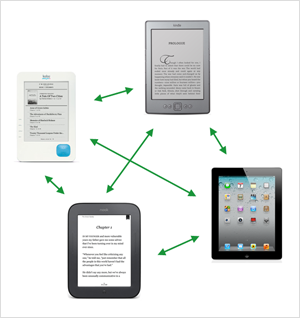
It's time for a unified ebook format and the end of DRM

This post originally appeared on Publishers Weekly.

EreadersImagine buying a car that locks you into one brand of fuel. A new BMW, for example, that only runs on BMW gas. There are plenty of BMW gas stations around, even a few in your neighborhood, so convenience isn't an issue. But if one of those other gas stations offers a discount, a membership program, or some other attractive marketing campaign, you can't participate. You're locked in with the BMW gas stations.

This could never happen, right? Consumers are too smart to buy into something like this. Or are they? After all, isn't that exactly what's happening in the ebook world? You buy a dedicated ebook reader like a Kindle or a NOOK and you're locked in to that company's content. Part of this problem has to do with ebook formats (e.g., EPUB or Mobipocket) while another part of it stems from publisher insistence on the use of digital rights management (DRM). Let's look at these issues individually.

Platform lock-in

I've often referred to it as Amazon's not-so-secret formula: Every time I buy another ebook for my Kindle, I'm building a library that makes me that much more loyal to Amazon's platform. If I've invested thousands or even hundreds of dollars in Kindle-formatted content, how could I possibly afford to switch to another reading platform?

It would be too inconvenient to have part of my library in Amazon's Mobipocket format and the rest in EPUB. Even though I could read both on a tablet (e.g., the iPad), I'd be forced to switch between two different apps. The user interface between any two reading apps is similar but not identical, and searching across your entire library becomes a two-step process since there's no way to access all of your content within one app.

This situation isn't unique to Amazon. The same issue exists for all the other dedicated ereader hardware platforms (e.g., Kobo, NOOK, etc.). Google Books initially seemed like a solution to this problem, but it still doesn't offer mobi formats for the Kindle, so it's selling content for every format under the sun — except the one with the largest market share.

EPUB would seem to be the answer. It's a popular format based on web standards, and it's developed and maintained by an organization that's focused on openness and broad industry adoption. It also happens to be the format used by seemingly every ebook vendor except the largest one: Amazon........

http://radar.oreilly.com/2012/02/unified-ebook-format-end-drm.html